An Artificially Intelligent Home
Explorations in Home Automation
Getting Started with Home Assistant (how and why)
August 15, 2022
In this (first) post I wanted to try to capture in one place the motivation behind setting up Home Assistant, how I am set up, and what I am trying to accomplish.
[Note- I reference specific products below but I have no relationship with any of the companies, and will not make any money if you buy them. All it means is that they work for me, but there are likely other options in many cases as well.]
If you are anxious to get started…
You could skip the stuff below and head straight to the Home Assistant Getting Started pages, which are fabulous. You may also want to check out some of the getting started videos (selecting hardware, mistakes to avoid, etc.) at my favorite source of help for Home Assistant: Everything Smart Home.
Why am I using HASS?
There are lots of smart/automated home products, many of which interoperate, all of which have their own apps. Many can be aggregated through Amazon, Apple, or Google home devices, and pretty much all of them use cloud services, making your home rely on working Internet and spreading your data around the world. You can also do pretty powerful things with services like IFTTT, but these are very simple things (one trigger, one action) so you can’t do less simple (but still not complicated) things like “turn on the light for 10 minutes” (turn on light; wait 10 min; turn off light - 3 actions, 2 too many for IFTTT) much less more sophisticated things such as actions that have conditions (only do X from 12am to 5am). (I love IFTTT and used it a lot, but with HASS I don’t need it)
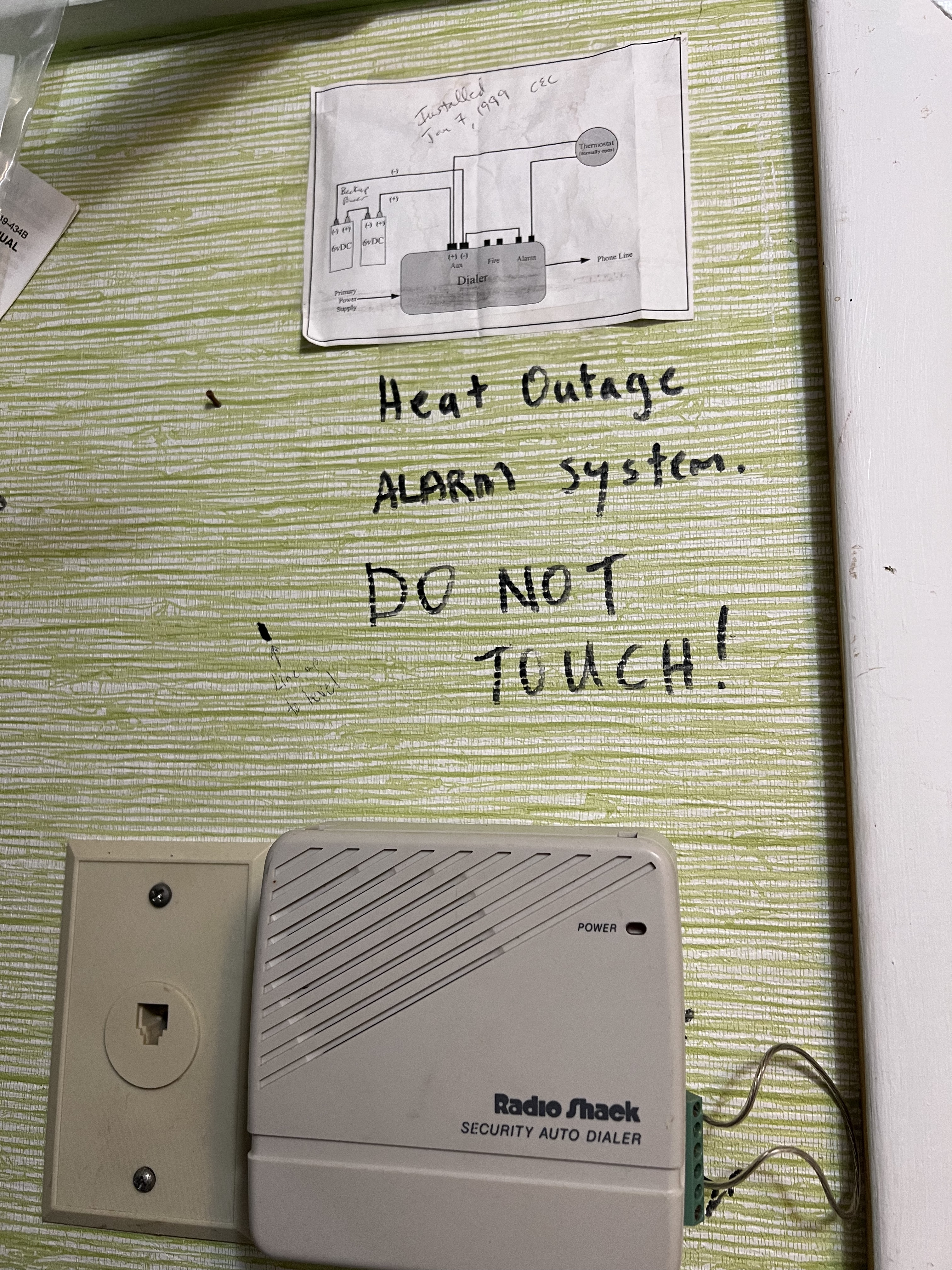 I started with DIY systems I built myself in about 1999 to avoid pipes
freezing in a house far from my home in case the power (thus heat) or
just the heat were to fail in winter. My first system used an old fashioned
thermostat wired to a Radio Shack auto-dialer (and a couple of (big) 6v
batteries in case of power outages), so if the power and/or heat went out in
winter (dropping the temperature, triggering the thermostat), I’d get a call
(this saved my pipes multiple times). Multiple generations of DIY later I found
myself accumulating many very nice (but independent) home automation systems.
Philips Hue lights and dimmer switches (and a hub), Samsung Smartthings (and a hub), Amazon Blink
cameras (and a hub), Aqara door sensors (and a hub), various smart outlets (no
hub, or rather the hub is in China…), etc. All of those hubs rely on Internet
connectivity to commercial clouds. I adopted HASS to (a) bring all of these
systems together, and (b) move as much as possible away from reliance on
Internet/cloud for my automations and data.
(Photo shows the original install, not sure what happened to that thermostat.
The install date on the schematic is Jan 7, 1999.)
I started with DIY systems I built myself in about 1999 to avoid pipes
freezing in a house far from my home in case the power (thus heat) or
just the heat were to fail in winter. My first system used an old fashioned
thermostat wired to a Radio Shack auto-dialer (and a couple of (big) 6v
batteries in case of power outages), so if the power and/or heat went out in
winter (dropping the temperature, triggering the thermostat), I’d get a call
(this saved my pipes multiple times). Multiple generations of DIY later I found
myself accumulating many very nice (but independent) home automation systems.
Philips Hue lights and dimmer switches (and a hub), Samsung Smartthings (and a hub), Amazon Blink
cameras (and a hub), Aqara door sensors (and a hub), various smart outlets (no
hub, or rather the hub is in China…), etc. All of those hubs rely on Internet
connectivity to commercial clouds. I adopted HASS to (a) bring all of these
systems together, and (b) move as much as possible away from reliance on
Internet/cloud for my automations and data.
(Photo shows the original install, not sure what happened to that thermostat.
The install date on the schematic is Jan 7, 1999.)
What am I doing with HASS?
I have a few important functions that I implement with HASS, which I would say fall into several categories.
-
Avoiding Unpleasant Events (or at least getting an alert when they happen, or might happen). I have moisture sensors located near the sump pump well, next to the water heater, and under the kitchen sink. I am immediately notified (lights turning on, text message) if moisture is detected. I built a sensor package that keeps track of how often the sump pump runs (how worried I should be if it were to stop), how often the water heater runs, and when the HVAC system is running. This gives me a feel for normal behavior, and on several occasions that has helped me anticipate problems and prevent them. I also learned when our water heater failed that early signs were extremely hot water and unusual duty cycles (relative to steady state) because the glass lining had deteriorated and formed a sludge covering the sensor that tells the heater to stop heating. The plumber said this deterioration is not at all uncommon, so now I watch for it (and of course, drain the tank every quarter or so). Similarly, the house that is 2h away, where pipes freezing got me started on this adventure, I built a sensor package that every 5 minutes sends the temperature of the crawlspace and whether the power is on. (it has a battery and cellular connectivity so can operate for a dozen hours if the power goes out). This gives me ample warning about power or heat outages before pipes start to freeze. Both of these devices talk to Home Assistant via MQTT. I also have sensors on the garage doors, so I get notified if a garage door is open for >10 min, because it’s heated and I don’t want to heat the front yard in winter. (these talk to Home Assistant via Zigbee)
-
Safety. In some spaces, such as the garage, or back deck, I have lights automatically turn on when doors open or movement is detected (no fumbling with wall switches). I use sensors to detect when any of our exterior doors open, so I can get notified if that happens when no one is home or in the dark of night. Or I can set actions such as turning on lights when those doors open. I use cameras just to be able to check on things whenever of from wherever I am. One is pointed at the sump pump so if it is running a lot (see 1) I can check in on it (from anywhere). I use several types of cameras along with a package (“add on”) called Frigate to detect when a human is seen in the front or back of the house Frigate saves a 30s clip and I can have the system do nothing or trigger a sequence of actions. (depending on the time of day or whether anyone is at home)
-
Remote Control. From anywhere on the Internet I can check on things, turn lights on or off, make sure doors are closed, open or close the garage doors, etc. I can also control the lawn irrigation system. All of these things are possible with individual apps from the companies that make those systems, but in HASS I have my own dashboard for the home.
-
Fun Stuff. I use Life360 with a family circle that HASS uses to keep track of how many of us are home (allowing me to have certain automated actions related to security when no one is home). I have another circle of a half dozen friends and keep track of how many of us are at our lab at any given time. At 4:30pm on weekdays HASS checks to see if 4 or more of us are there, and if so we all get a text (and slack) message suggesting we go to the pub.
What are a couple of things to get rolling?
My suggestion is to start with the systems you have (if any), and integrate them with HASS. Doing so in the simplest fashion (without ditching their hubs) won’t affect other things you already might do such as through your Amazon/Apple/Google assistants, IFTTT, or the associated smartphone apps. But to get the best value from HASS you’ll want to get rid of the hubs (where possible) and have them talk directly to HASS (depending on the system, this may be a simple reset or may require new firmware, see my systems description below). You can check out what “integrations” are available and it’s likely that your systems are supported with integrations.
If you don’t have any systems, you might start with something like moisture detection, smart outlets for things like holiday lights or outdoor lights (e.g., turn them on at dusk and off at midnight). If you are adventurous, you might skip right to Frigate and have the lights turn on when a human shows up after dark (yes, you can do this with many products via motion detection, but they can’t tell the difference between a human and a strong wind hitting tree branches). From there you could try some of the systems I use or other things you find in the plentiful online documentation, community forums, and YouTube channels from the HASS community.
If you do go with Frigate you will want a Coral TPU but a Raspberry Pi4 (see Hardware discussion below) can keep up with a single camera, albeit Frigate will use 70-80% of the CPU. Don’t even think about doing Frigate with a Pi3. (I tried) Frigate will take a Pi3 to its knees . I really like the Amcrest wifi cameras (see my inventory of devices below) - inexpensive and easy to config in Frigate.
Getting Started
Hardware
-
Your server. You will want at minimum a Raspberry Pi4, but you might also consider more powerful platforms such as a Nuc. The HASS installation pages show other platforms that are supported.
-
Storage. If you have a very simple system in mind you can get by with a small (e.g, 32GB microSSD) on a Pi4 as suggested on the installation pages linked below. But chances are you will want to do more ambitious things like Frigate or better database options, in which case you should buy an SSD (go for 1 TB at least).
-
Other. If you plan to use Frigate, you will need to either go with one of the beefier servers or get a Coral TPU (USB device that plugs into your server). A Pi3 is probably fine if all you are doing is controlling lights and monitoring sensors, but Frigate will bring it to its knees (it will be unresponsive). A Pi4 can barely keep up with 1 camera, using 70-80% of its CPU to do so and giving you sluggish performance interacting with the system.
*NOTE: Unfortunately as of August 2022 it is nearly impossible to find either a Pi4 or a Coral TPU (except from opportunitists at insane prices).
Software and Installation
Here you should dive into the fabulous online documentation that will walk you through. I would advise that you go with Home Assistant Operating System (the first option on the “Installation” page. The other options are more advanced, but also more complicated. For instance, you can install Home Assistant Container as a docker image if you have a beefy server (e.g., you can run Docker and there is a version of Home Assistant Container that runs on Synology NAS systems like mine). But an important component of Home Assistant called Supervisor must then be installed separately in order to get functions that you will need. So unless you are good with Linux and Docker, and have something specific in mind you want to do that requires this approach, go for Home Assistant OS. (you can migrate easily later, as HASS has nice backup/restore functions)
Follow the Getting Started guide!
More Help and Ideas
Googling helps, and the Home Assistant site has extensive documentation on all aspects, integrations, add-ons, etc. of Home Assistant. There is also an active [Home Assistant Community] (https://www.home-assistant.io/getting-started/join-the-community/) you can join, which has lots of resources and tutorials. I myself have found Everything Smart Home to be excellent for both beginning and advanced things. For instance, tutorials on installing your first system, one on mistakes to avoid, and another on things to do once you are up and running. You might start with the Home Assistant Guide playlist there.
What exactly do I have (in case you are curious)
Hardware
- Mini-PC (generic, Intel Celeron) with a 1TB SSD.
- Coral TPU
- Zigbee USB stick (combined gateway and radio, controlled via a HASS add-on and integration)
- Z-Wave USB stick (combined Gateway/radio, controlled via HASS integration).
I ran on a Pi4 with a 32GB microSD card for a few years but switched to an SSD because (a) Frigate filled it up while I wasn’t looking and (b) I wanted to move to InfluxDB and Grafana for fancy graphing, etc. and this will have a lot more storage activity, shortening the life of the microSD card.
Home Assistant Install
I run Home Assistant Operating System.
Commercial Components / Systems
- Hue lights and dimmer switches
- Samsung Smartthings moisture sensors and door/window multi-sensors. I was able to turn off the hub, reset these units, and add them to my HASS system via the Zigbee integration (and the Zigbee USB stick, see Hardware).
- Orbit B-Hive irrigation system
- TP-Link smart plugs
- WiOn Outdoor Wifi Smart Plugs.
- Zooz Z-Wave outdoor smart plugs. (requires the Z-Wave USB stick, see Hardware)
- MyQ garage door controller (works with most modern but not all openers) (Relies on MyQ cloud).
- Aqara door sensors (all exterior). I was able to turn off the hub, reset these units, and add them to my HASS system via the Zigbee integration.
- Lutron Caseta switches (I have not explored whether I can ditch the hub) Make sure you have relatively modern wiring with ground in switch boxes, but these are pretty cool if you don’t want to mess with wiring at all!
- IKEA motion sensors and Zigbee signal repeaters
- Aoycocr smart plugs that I
hacked to run
Tasmota. Sadly, Aoycocr updated their firmware
about 2 years ago so that this process no longer works. Thus, like TP-Link, you have to use their software to control, and you might not really want your wifi ssid and password to be shared with a cloud server in a country across the ocean.
- Update I recently ordered some ESP-based, Tasmota-enabled smart plugs from Athom.tech that are terrific.
DIY sensors
- Particle Photon to create a utilities monitor to track the duty cycles and activities of my sump pump, water heater, and HVAC system. This system checks that state of these utilities every few seconds and reports to HASS using MQTT.
- For the home 2h away I use a Particle Electron (celular with a backup LiPo battery, so does not rely on power/Internet and thus can report such outages) to create a crawlspace temperature monitor so that I am alerted whenever the crawspace drops near to freezing temperatures.
HASS Add-ons
- InfluxDB database
- Grafana for fancy time series graphs
- Studio Code Server
- SSH & Web Terminal
- Z-Wave JS
- Mosquitto broker (MQTT)
- ESPHome
- Frigate (via HACS)
Cameras
For Frigate I have three cameras. One is a Ubiquiti Unifi Protect G4-Bullet PoE camera. It’s a really nice, solid, high-quality camera but pretty expensive. Moreover it requires a proprietary (and expensive) Ubiquiti Network Video Recorder (NVR). Fortunately there is a third party compatible NVR package that runs on my Synology NAS. This requires fiddling with Docker installs of third party packages on the NAS system which is extra complexity and steps. I recently bought two much less expensive Amcrest Smarthome 1080p Wifi Outdoor Security Cameras. These don’t require a separate NVR so are a snap to get running.
About Networks
You’ll want to make sure your home wifi router can do DNS reservations so that your server and cameras always get the same IP address. This is important for configuring the cameras (via their RTSP URLs) as well as for MQTT so devices can find the server. If you plan to access HASS remotely (it has a very nice smartphone app) you’ll also want to forward port 8123 for HASS and 1883 for MQTT. For $6/mo though you can subscribe to Nabucasa, a company run by Home Assistant founders that provides remote access without opening ports on your router.